
In-company training · Storyline, slide structure and visualisation
In-company presentation training: visual storytelling and presenting
Build PowerPoint decks that strengthen the story and stand on their own without explanation. + How does AI speed this up?
Slides full of bullet points make the audience read instead of listen. In this presentation training you learn to build a presentation as a storyline, choose one message per slide and support that message visually. You go from slide-maker to someone who prepares a decision with a deck, even when the deck travels through the organisation without you there to explain it.
- Duration
- One training day (two half-day sessions) or two separate half-day sessions
- Group size
- 4 to 8 participants per trainer for individual feedback; larger groups as a workshop, or with a second trainer
- Location
- At your offices, anywhere in the Netherlands. Travel costs included
- Preparation
- Participants submit their own memo, presentation or problem in advance; we build the cases around it
- Follow-up
- Tailored: for example short emails with one exercise at a time and a buddy from the group, by arrangement
- Investment
- Quote on request, depending on format, number of participants, depth, preparation and duration; excl. VAT, incl. travel costs
Who it's for
Professionals who create presentations for management, the executive team or clients: consultants, analysts, project leaders, marketers and staff.
Sound familiar?
Your audience reads along with your slides instead of listening to you.
You spend hours shifting boxes around in PowerPoint without it ever looking tidy.
Your deck gets forwarded and, without your explanation, raises questions.
Result
After this training you can
Build a storyline
You decide the key message and the slide titles before you format a single slide; the titles alone already tell the story.
Choose between a reading, discussion or presentation deck
You know when a deck serves as a reading document, as the basis for a discussion or for a live presentation, and adapt the structure to it.
Apply visual hierarchy
With white space, contrast and alignment you steer the reader's eye to the message.
Work faster in PowerPoint
Fixed layouts and shortcuts halve the time you spend on formatting.
Programme
A training day in practice
The programme below is the starting point; we tailor the content, cases and duration to your practice.
Intake and the 10-second test on slides
We look at participants' slides: what does a reader understand in ten seconds?
Storyline first
From key message to slide titles; the horizontal and vertical logic of a deck.
One message per slide
Titles that are a conclusion; what does and does not belong on a slide.
Lunch
Visualising
From text to figure: structures, processes, comparisons and numbers as visuals.
Rebuilding your own deck
Participants rework a presentation of their own, with feedback from the trainer.
Working faster in PowerPoint
Layouts, shortcuts and tools that save time.
Wrap-up and action plan
The method
What is the Pyramid Principle?
The Pyramid Principle (also known as the Minto Pyramid) is a method for structured thinking and top-down communication, developed by Barbara Minto at McKinsey & Company and set out in her book The Pyramid Principle: Logic in Writing and Thinking (1978). The core: lead with the conclusion or recommendation, support it with three or four main arguments at most and back each argument with facts and analysis.
Read the explanation →The trainers
Former consultants from McKinsey, SparkOptimus, Accenture and EY VODW, PowerPoint specialists and former journalists. For each training, the specialist who did that work for years, with feedback on your real work.
About Consultant Skills →We have trained teams at











FAQ
Frequently asked questions about this in-company training
Is the training about PowerPoint or about presenting?
Both, in that order: first the structure of the story, then the slides, then the tools. Once you master the storyline, you make good slides in PowerPoint much faster.
Do we work in our own corporate template?
Yes. We ask participants to send in a deck of their own in the organisation's template beforehand.
Is this also suitable for reading decks sent by email?
Especially so. We cover the difference between a presentation deck and a reading deck, and how to make a deck that stands up without explanation.
What does the in-company training Visual storytelling & presenting (PowerPoint) cost?
The price is on request and depends on the format (a half-day workshop, a training day with 4 to 8 participants or a multi-day programme with coaching), the number of participants, the depth, the preparation and the duration. Always excl. VAT and incl. cases on your own documents, individual feedback and travel costs. After a thirty-minute call, you receive a tailored proposal within a week.
Can you train a team of 10 people on site?
Yes. With up to 8 participants, one trainer gives everyone individual feedback on their own work; that is what we recommend. With 10 people, you choose: a workshop with the whole group, where you lose that individual depth, or a second trainer so everyone still gets feedback on their own document. We train a department of 30 in three or four groups to the same standard, usually within two to four weeks.
How long is the training and where does it take place?
One training day (two half-day sessions) or two separate half-day sessions. At your own offices, anywhere in the Netherlands; only the individual programme is online. A training day can usually be scheduled within four to six weeks.
Can you deliver the training in English?
Yes. We deliver our in-company trainings in English or in Dutch. Tell us in the introductory call which language suits your team.
For your organisation
This training for your team?
In a thirty-minute call we discuss your situation, the participants and what the training needs to deliver. You then receive a tailored proposal.
Thirty minutes, online. We reply within one working day.
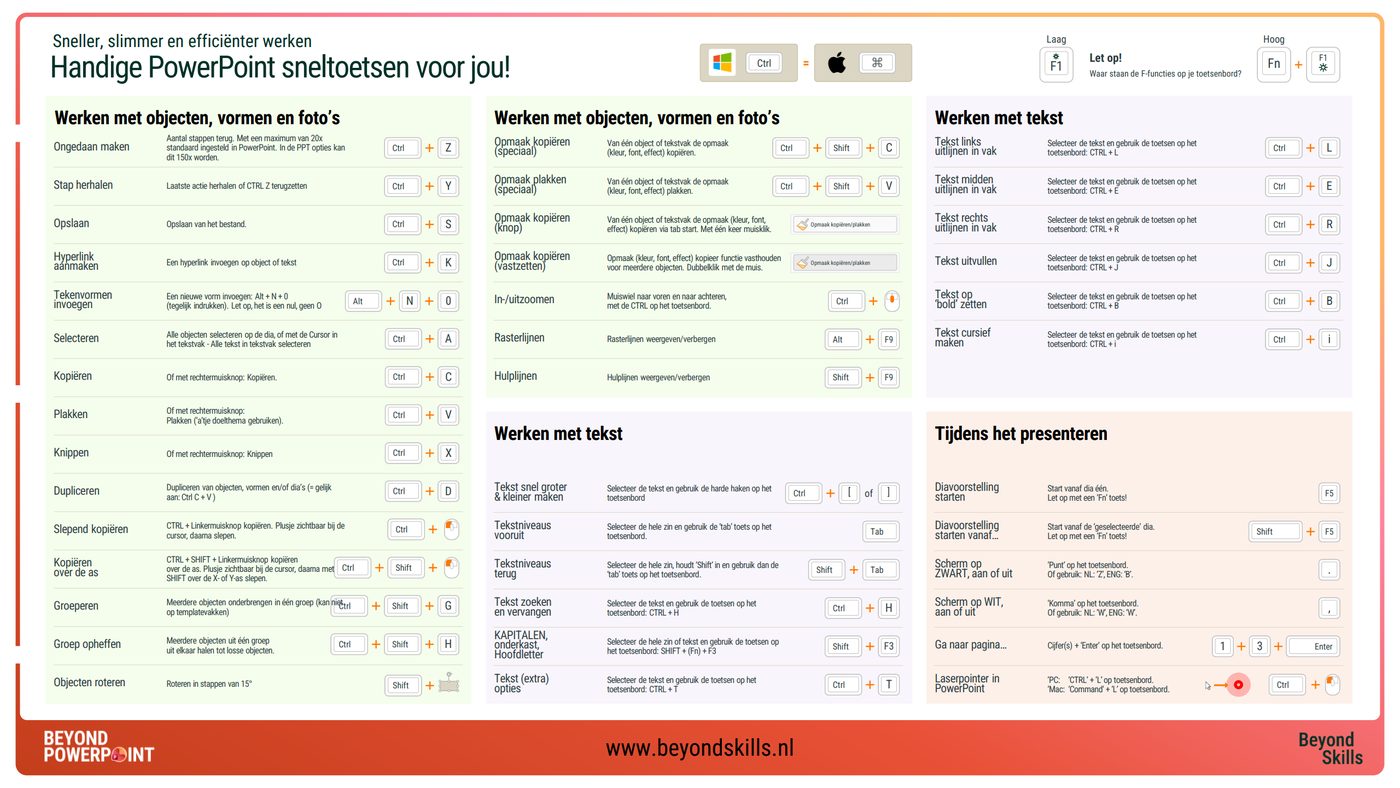
Free download
Handy PowerPoint shortcuts for you
One overview of the shortcuts that halve your formatting time: working with objects, shapes and photos, working with text, and the keys to use while presenting. For Windows and Mac.
Once you have entered your email address and phone number, the PDF (in Dutch) is ready straight away.